Ollama vs LM Studio: CLI, GUI & Local API Server Compared
Both Ollama and LM Studio share llama.cpp underneath and expose OpenAI-compatible local endpoints, yet they split cleanly on workflow: Ollama leads container automation on port 11434 with macOS TTS support, while LM Studio adds Apple MLX acceleration alongside its lms CLI and llmster headless daemon.
THE STORY IN THREE POINTS
- Short verdict: pick Ollama (MIT, localhost:11434) for Dockerized services, terminal coding agents, and headless Linux automation; pick LM Studio (localhost:1234) for visual GGUF/MLX model browsing, per-layer GPU offload sliders, and Apple Silicon MLX acceleration.
- Outdated comparisons claiming LM Studio is strictly click-only are obsolete: LM Studio v0.4.0+ ships the lms CLI and llmster headless daemon for GUI-free Linux servers, while Ollama v0.40.11+ adds an OpenAI-compatible /v1/audio/speech endpoint for local macOS TTS models.
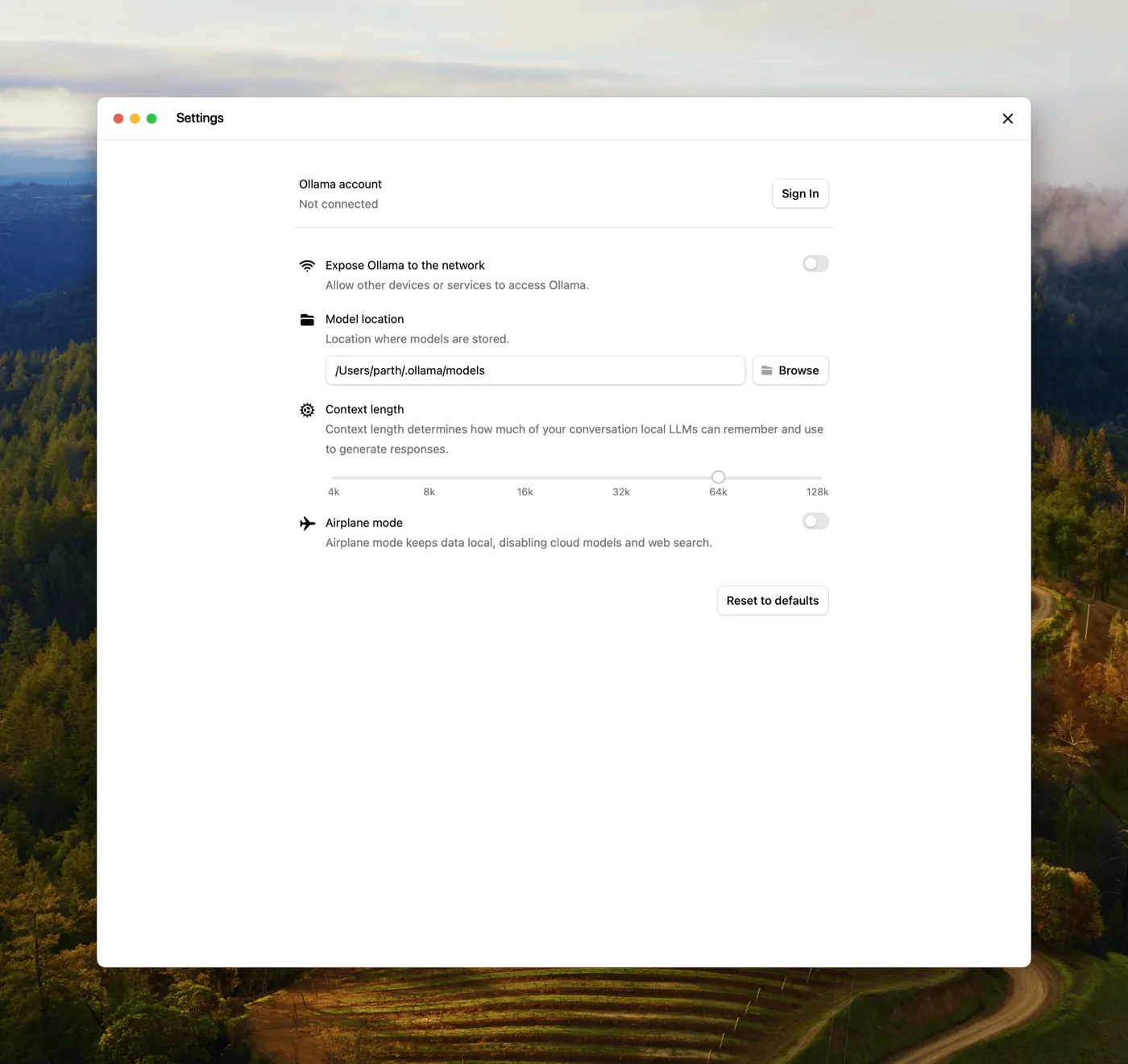
- For coding agents such as Aider, Cline, and OpenCode, remember Ollama’s 4,096-token default OLLAMA_CONTEXT_LENGTH—which truncates large prompts unless raised—and move to vLLM or SGLang once concurrent requests exceed local single-developer scale.
Architecture: shared llama.cpp core vs native Apple MLX support
For developers comparing Ollama vs LM Studio—still the highest-demand head-to-head query in local LLM deployment—raw decode throughput on identical GGUF checkpoints rarely separates the two tools because both run llama.cpp under the hood. The practical engineering split starts with backend breadth and hardware controls. Ollama prioritizes zero-friction pull-and-run ergonomics via Modelfiles and an MIT-licensed Go daemon listening on localhost:11434, while adding newer multimedia endpoints such as macOS local text-to-speech over OpenAI-compatible /v1/audio/speech in v0.40.11+ (supporting models like Gradium Phonon).
LM Studio pairs its llama.cpp engine with first-class Apple MLX runtime integration on macOS alongside an interactive inspector for inspecting Hugging Face quantizations, KV-cache quantization, context windows, and GPU layer offloading without hand-editing configuration files. On unified-memory Macs, that dual GGUF-plus-MLX runtime lets developers benchmark mixed-precision GGUF prompt ingestion against native MLX decode directly inside one client—a trade-off we audit in depth in our GGUF vs MLX on Apple Silicon benchmark.
Headless server mode: ollama serve vs LM Studio lms CLI and llmster
Many legacy tutorials still dismiss LM Studio as a mouse-only desktop application that cannot run inside server pipelines. As documented in LM Studio’s v0.4.0+ tooling rollout and Shattered.io’s local runtime comparison, LM Studio now ships both the lms command-line utility (lms get, lms load, lms server start) and llmster, a GUI-free background daemon built specifically for headless Linux hosts, SSH boxes, and automated local API routing.
Even with llmster closing the server gap, Ollama remains simpler to drop into systemd units, CI runners, and official Docker images where open-source MIT auditability and minimal container footprint matter. Neither local runner, however, replaces continuous-batching production engines under multi-user concurrency: as demonstrated in our Ollama vs vLLM throughput audit, Ollama serializes slots by default (OLLAMA_NUM_PARALLEL=1) and plateaus around 41 tokens/s on a single A100 where PagedAttention scales past 790 tokens/s.
Agent integration: configuring Aider, Cline, and OpenCode cleanly
Both tools expose OpenAI-compatible /v1/chat/completions endpoints—Ollama at http://localhost:11434/v1 and LM Studio at http://localhost:1234/v1—making them drop-in local providers for open-source coding agents including Aider, Cline, Qwen Code, and OpenCode 2.3.0. Ollama wins initial scripting speed when provisioning ephemeral developer sandboxes because a single ollama pull command fetches and registers tool-calling checkpoints automatically.
Before pointing an autonomous coding agent at either server, verify context length and tool-schema handling explicitly. Ollama’s default 4,096-token OLLAMA_CONTEXT_LENGTH silently trims repository files and system prompts unless overridden via environment variable or Modelfile num_ctx (64K+ recommended for multi-file edits), whereas LM Studio surfaces active context memory usage visibly in its server logs and supports structured JSON schemas alongside concurrent multi-model loading.
Sources: Ollama Official Documentation & OpenAI Compatibility Reference|Ollama ↗ LM Studio CLI (lms) & Headless Daemon (llmster) Docs|LM Studio ↗ Ollama vs LM Studio vs llama.cpp vs vLLM: Local LLM Runtimes in 2026|Shattered.io ↗ Ollama vs LM Studio Local LLM Search Demand & Feature Analysis|CherCode ↗
THE BROADER CONTEXT · FRONTIER LABS DOSSIER
Explore full product specifications, pricing analysis, and continuous coverage in the Frontier Labs Desk Hub and Others Dossier. Independent benchmarks available on the AI Intelligence Index and Coding Agents Leaderboard.