Ollama Context Length: Why It Caps at 4K & How to Fix It
Ollama silently locks context at 4,096 tokens on machines under 24 GiB VRAM—and setting OLLAMA_NUM_CTX or passing num_ctx to /v1/chat/completions does nothing. Here is the OLLAMA_CONTEXT_LENGTH fix and how to verify it with ollama ps.
THE STORY IN THREE POINTS
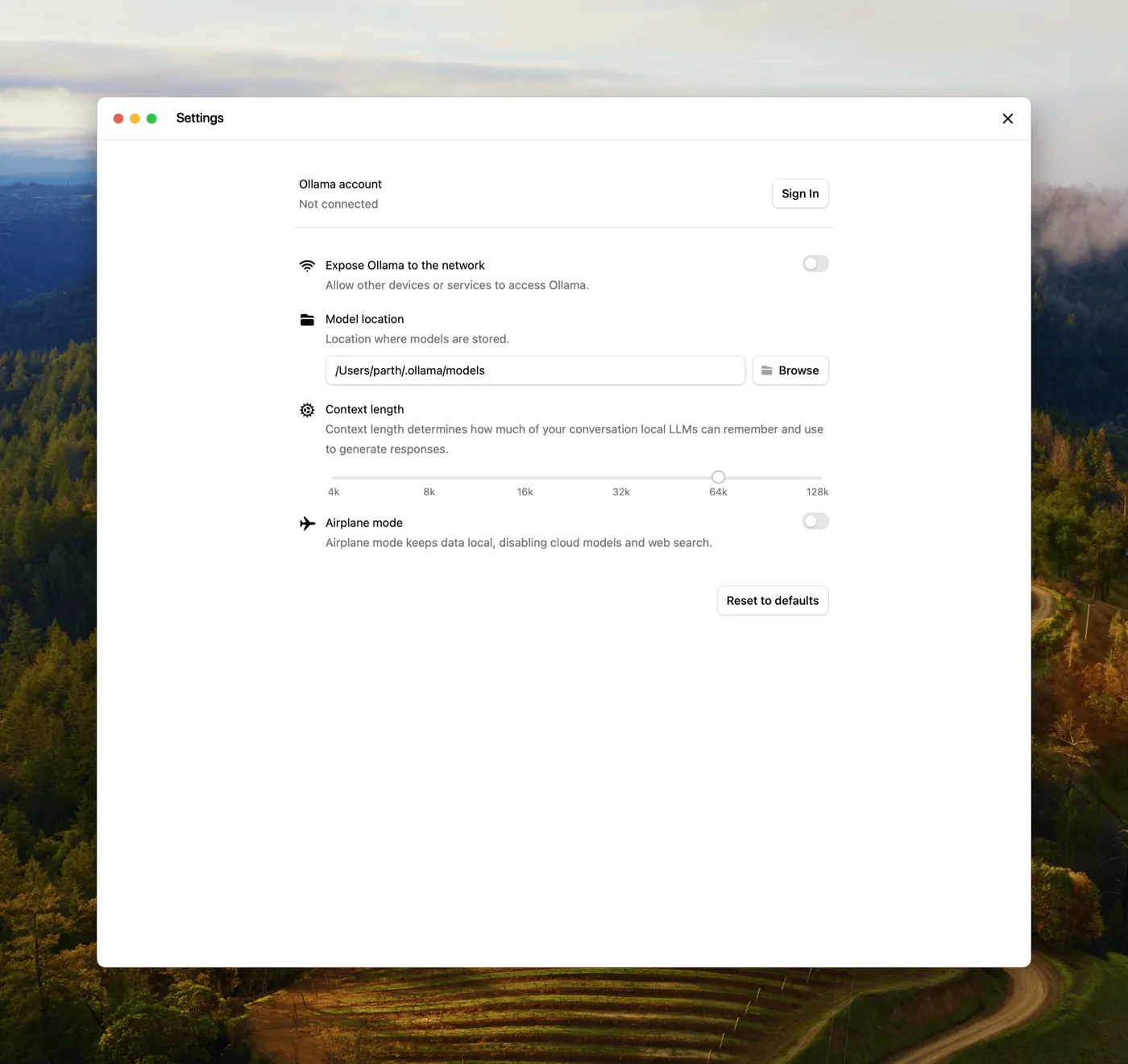
- Immediate fix: set OLLAMA_CONTEXT_LENGTH=64000 (or 32768) in your server environment—via systemd override on Linux, launchctl setenv on macOS, or Windows environment variables—then run ollama ps and confirm the CONTEXT and PROCESSOR columns update without CPU spillover.
- Ollama does not use a single global default anymore: current documentation scales initial context by available VRAM (<24 GiB defaults to 4K, 24–48 GiB defaults to 32K, and >=48 GiB defaults to 256K), while explicitly recommending at least 64,000 tokens for coding tools and agents.
- Two silent traps break agent setups: OLLAMA_NUM_CTX is not a recognized Ollama server variable, and the OpenAI-compatible /v1/chat/completions endpoint silently drops per-request num_ctx (issue #11409)—causing long system prompts and reasoning models like Qwen3.8 to truncate silently or return HTTP 500.
The immediate fix: set OLLAMA_CONTEXT_LENGTH and verify with ollama ps
If your local coding assistant or multi-step agent forgets system instructions halfway through a session, set OLLAMA_CONTEXT_LENGTH=64000 (or 32768 on tighter GPUs) at the server process level before starting Ollama. On Linux systemd installations, run sudo systemctl edit ollama, add Environment="OLLAMA_CONTEXT_LENGTH=64000" under [Service], and restart the daemon; on macOS desktop builds, run launchctl setenv OLLAMA_CONTEXT_LENGTH 64000 and quit and reopen the Ollama app; on Windows, add OLLAMA_CONTEXT_LENGTH under User Environment Variables and relaunch Ollama from the Start menu.
Never assume a setting took effect until you check active memory allocation. Send one test message and run ollama ps: read the CONTEXT column for the actual allocated token budget (do not rely on ollama show, which prints the model’s theoretical architectural maximum rather than runtime VRAM allocation) and verify PROCESSOR still reads 100% GPU rather than spilling onto CPU.
Why Ollama defaults to 4K on 16GB machines—and why old docs conflict
Developers searching for Ollama’s context ceiling run into contradictory answers because older community threads quote 2,048, while Ollama’s own FAQ historically quoted 4,096 as a blanket figure. As documented in Ollama’s context length reference and Kaxo.io’s November 12 engineering breakdown, current Ollama builds instead assign defaults dynamically by detected VRAM: machines with under 24 GiB VRAM (including 8 GB–16 GB laptops and GPUs) load at 4K (4,096 tokens), systems with 24–48 GiB default to 32K (32,768 tokens), and workstations with 48 GiB or more unlock 256K (262,144 tokens).
Ollama’s own documentation flags 4K as too small for web search, coding tools, and agentic pipelines, recommending at least 64,000 tokens. As FreakyJolly’s November 19 configuration guide notes, raising context scales KV-cache memory linearly—and setting OLLAMA_NUM_PARALLEL above 1 multiplies that KV cache per concurrent slot—so pairing higher windows with OLLAMA_KV_CACHE_TYPE=q8_0 roughly halves KV memory pressure on 16 GB and 24 GB machines.
OLLAMA_CONTEXT_LENGTH vs. invalid OLLAMA_NUM_CTX and the /v1/ endpoint trap
Because Ollama uses OLLAMA_ prefixes across most server knobs while using num_ctx inside Modelfiles (PARAMETER num_ctx 65536), interactive chats (/set parameter num_ctx 65536), and native API payloads, developers routinely export OLLAMA_NUM_CTX. That environment variable does not exist in Ollama’s server code and is silently ignored.
Worse, BetterClaw’s agent-truncation audit highlights why agent frameworks stay stuck at 4K even after passing num_ctx in JSON: nearly every SDK talks to Ollama’s OpenAI-compatible /v1/chat/completions endpoint, which maps a fixed allowlist of OpenAI sampling parameters and drops num_ctx silently (tracked in Ollama GitHub issue #11409). Until you either configure OLLAMA_CONTEXT_LENGTH server-wide, bake a custom variant via ollama create my-coder-64k -f Modelfile, or call native /api/chat with options.num_ctx, external agents continue running inside 4,096 tokens.
Why Qwen3.6 and Qwen3.8 thinking traces fail inside 4K windows
Silent front-end context trimming breaks autonomous agents far harder than casual chat because system prompts, tool schemas, and AGENTS.md or soul.md project rules sit at index zero. When an agent sends 6,000 tokens of repo files and reasoning traces into a 4,096-token allocation, Ollama drops the oldest tokens first—erasing behavioral guardrails while returning fluent, hallucinated tool calls.
Reasoning models such as Qwen3.6 and Qwen3.8 compound the problem by emitting thousands of thinking tokens per turn; once multi-turn trimming strips back past the latest user prompt, models like Qwen3.8 fail loudly with an HTTP 500 no user query found in messages error. Raising OLLAMA_CONTEXT_LENGTH to 64K and picking right-sized weights from our Ollama VRAM tier guide and best local coding LLM picks eliminates both silent truncation and loop crashes—whether pairing Ollama with OpenCode or comparing server runtimes in our Ollama vs LM Studio guide.
Sources: Context length|Ollama Documentation ↗ Ollama Truncates Your Agent Config: The num_ctx Fix (2026)|BetterClaw ↗ OLLAMA_NUM_CTX Is Not an Ollama Setting: How to Actually Set the Context Length|Kaxo.io ↗ Ollama Context Length: Check and Increase num_ctx (2026)|FreakyJolly ↗ Issue #11409: Add force num_ctx option|ollama/ollama (GitHub) ↗
THE BROADER CONTEXT · FRONTIER LABS DOSSIER
Explore full product specifications, pricing analysis, and continuous coverage in the Frontier Labs Desk Hub and Others Dossier. Independent benchmarks available on the AI Intelligence Index and Coding Agents Leaderboard.