Model Context Protocol (MCP) Architecture Guide: Client Setups, Servers and Security
Understanding the Model Context Protocol across Claude Desktop, Cursor, and enterprise developer tools with connection security best practices.
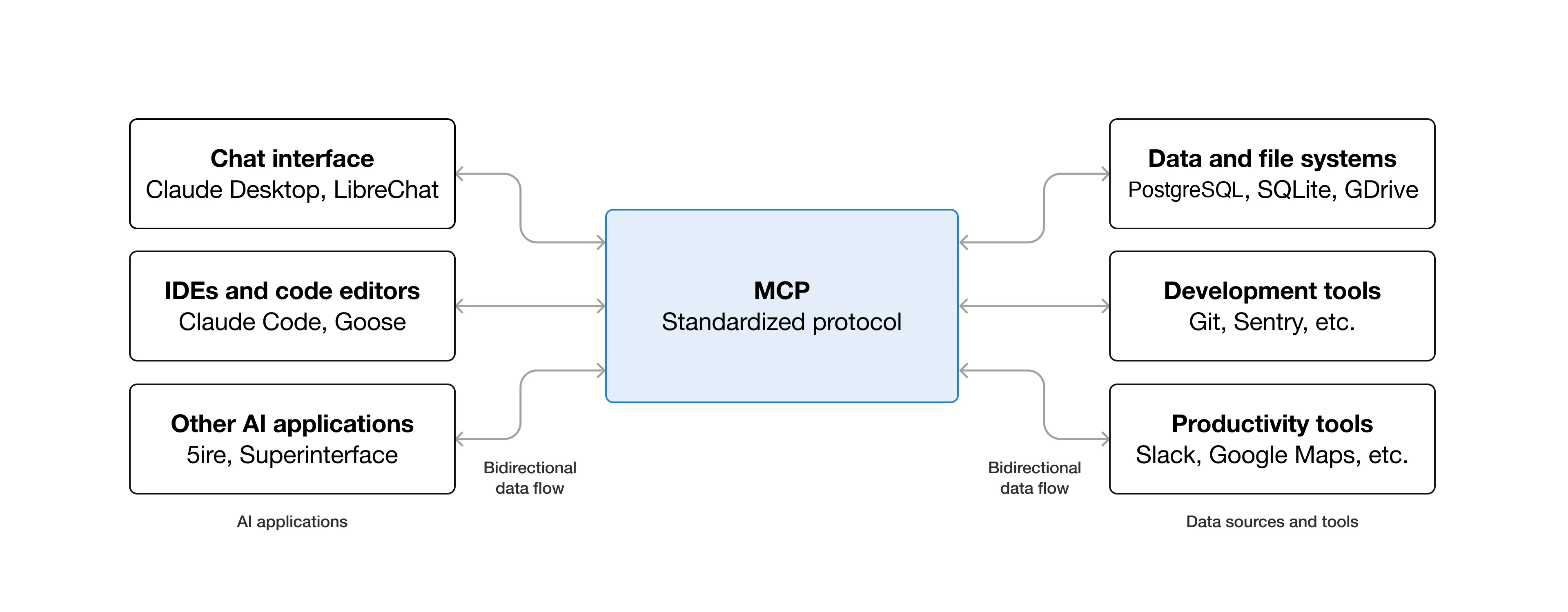
THE STORY IN THREE POINTS
- The Model Context Protocol (MCP), open-sourced by Anthropic, has emerged as the standard protocol connecting AI agents to local files, databases, and third-party APIs.
- Client adoption spans Claude Desktop, Cursor, and emerging IDE extensions, utilizing JSON-RPC over stdio or SSE transport layers.
- Security best practices require sandboxing MCP servers, auditing permission escalations in configuration files, and avoiding unvetted third-party connector scripts.
Protocol architecture: Resources, Prompts, and Tools in the MCP specification
As software developers transition from isolated chatbot interfaces toward autonomous agent execution, managing how language models interface with external systems has become an acute engineering challenge. Anthropic open-sourced the Model Context Protocol (MCP) as an open standard designed to replace bespoke API integrations with a unified architectural pattern.
MCP structures interactions through three core primitives: Resources (contextual data streams such as file contents, git commit logs, or database records), Prompts (pre-engineered prompt templates surfaced to the client), and Tools (executable functions that perform external actions, such as running a bash command or writing to an external API). Communication utilizes JSON-RPC 2.0 messages transmitted via standard input/output (stdio) for local processes or Server-Sent Events (SSE) for remote servers.
Client setup walkthrough: Configuring Claude Desktop, Cursor, and Codex CLI
Client adoption of the MCP standard has accelerated rapidly. In Claude Desktop, users configure servers by editing the local JSON configuration file (claude_desktop_config.json), registering executable command strings and environment variables for local servers such as Postgres, GitHub, SQLite, and filesystem connectors.
Similarly, coding environments including Cursor and emerging CLI orchestration harnesses have implemented native MCP client support. This allows developers to point an IDE agent at pre-built MCP servers without writing custom connector shims, unifying tool access across different model providers.
Security governance: Mitigating prompt injection and credential leaks in MCP servers
While MCP drastically simplifies agent tooling, it introduces distinct attack surfaces. Because MCP tools often possess elevated operating system permissions (such as modifying files or executing terminal scripts), untrusted prompt injections in scraped data can induce agents into executing malicious commands.
Security best practices mandate running MCP servers inside unprivileged Docker containers, restricting filesystem access to explicitly declared project directories, and requiring interactive human approval for destructive tool calls. Developers can review local configuration auditing procedures in our Claude Code settings local secrets audit and inspect browser permission gates in OpenCode Browse permissions guide.
Sources: Model Context Protocol (MCP) Specification & Architecture Documentation|Anthropic ↗ MCP Server Registry and Pre-Built Connectors Overview|GitHub Model Context Protocol ↗ Claude Desktop MCP Integration Guide and Troubleshooting|Anthropic Support ↗
THE BROADER CONTEXT · CLAUDE DOSSIER
Explore full product specifications, pricing analysis, and continuous coverage in the Claude Desk Hub. Independent benchmarks available on the AI Intelligence Index and Coding Agents Leaderboard.