How to Build an MCP Server: TypeScript, Python & Inspector
Older 2025 tutorials still teach deprecated HTTP+SSE transports. Here is the 5-step guide to building an MCP Server under the 2026-07-28 spec using Python FastMCP or TypeScript, local stdio or Streamable HTTP, and interactive MCP Inspector verification.
THE STORY IN THREE POINTS
- Skip outdated 2025 GET-SSE tutorials: the 2026-07-28 Model Context Protocol specification replaces separate legacy GET SSE endpoints and protocol-level sessions with local stdio (for desktop/CLI hosts) and a single unified Streamable HTTP POST endpoint supporting JSON or request-scoped SSE responses.
- Choose Python FastMCP for concise decorator-driven data/ML wrappers or the official TypeScript @modelcontextprotocol/sdk paired with Zod schemas when strong typing and Node ecosystem libraries dominate—always routing diagnostic logs to stderr so stdout stays pure JSON-RPC over stdio.
- Validate every new server locally with MCP Inspector (npx @modelcontextprotocol/inspector) before connecting it to Claude Code, Cursor, or Antigravity CLI, enforcing OAuth 2.1 scopes on remote HTTP deployments and clean env-var secret injection.
What changed in the 2026-07-28 MCP spec: stdio and Streamable HTTP
Developers searching how to build an mcp server often lose hours debugging tutorials written against 2024–2025 drafts that pair a legacy /sse GET stream with separate /messages POST handlers. Per the 2026-07-28 Model Context Protocol specification and MCPJam’s TypeScript implementation guide, legacy GET stream endpoints and stateful protocol-level sessions have been retired.
Modern servers target two clean transports: stdio for local desktop and terminal clients (where the host spawns your script as a child process), and Streamable HTTP for remote multi-user deployments—exposing one unified HTTP POST endpoint that accepts JSON-RPC requests and replies with either a single JSON object or a request-scoped SSE stream, backed by OAuth 2.1 bearer validation and standardized HTTP 403 insufficient_scope challenges.
Steps 1–2: Pick Python FastMCP or TypeScript SDK and define typed tools
Start by selecting the SDK matching your backend runtime, as detailed in HoneyHive’s November 12 engineering guide and InterviewBit’s November 13 walkthrough. Python teams building database, RAG, or scientific wrappers move fastest with FastMCP: instantiate FastMCP("inventory-server"), decorate async Python functions with @mcp.tool(), and rely on Python type hints and docstrings to auto-generate strict parameter schemas.
TypeScript teams building web, SaaS, or monorepo utilities initialize McpServer from @modelcontextprotocol/sdk and call server.registerTool with explicit Zod input schemas, human-readable parameter descriptions, and bounded return objects. In both languages, keep tool names unambiguous, validate paths or SQL queries strictly, and observe one non-negotiable rule for stdio servers: never write console.log or print() diagnostics to stdout, because any stray character breaks JSON-RPC framing—always log strictly to stderr.
Steps 3–4: Bind transport and debug payloads with MCP Inspector
For local engineering utilities consumed by Claude Code, Cursor, or OpenCode, attach StdioServerTransport (or mcp.run() in FastMCP). For shared team services hosted behind Kubernetes or reverse proxies, expose Streamable HTTP over TLS—ensuring reverse proxies do not buffer request-scoped SSE streams and documenting required OAuth scopes for remote clients.
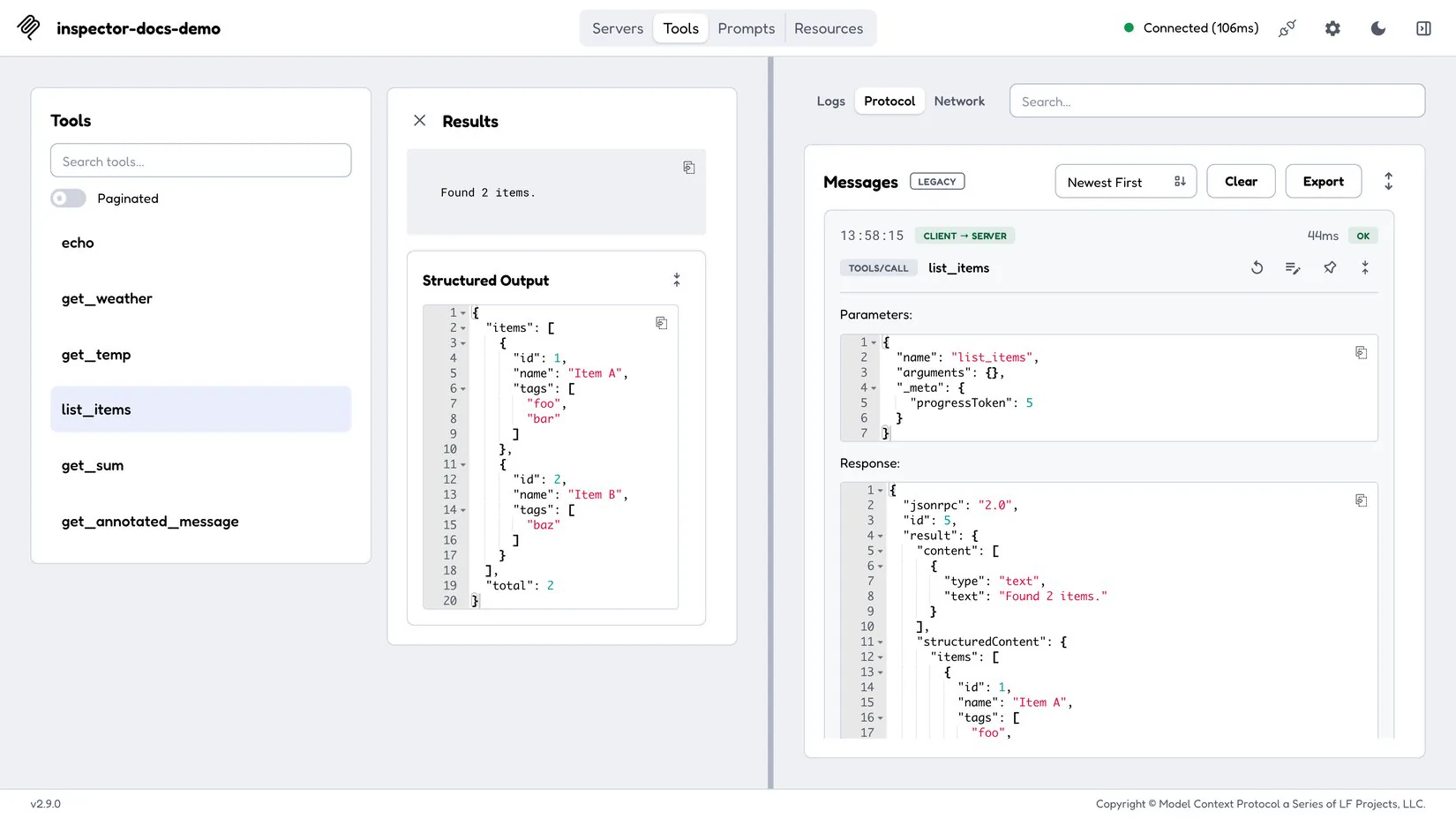
Before pointing any LLM at your server, run the official interactive debugger with npx @modelcontextprotocol/inspector (alongside CLI workflows covered by Flavio Copes’ November 6 tutorial). MCP Inspector spins up a local web console letting you trigger tools/list, inspect generated JSON Schemas, execute live tool calls with edge-case payloads, and catch schema or stderr regressions immediately without burning LLM tokens.
Step 5: Wire into Claude Code or Cursor cleanly and enforce least privilege
Once verified in MCP Inspector, register local servers cleanly in Claude Code via claude mcp add or .mcp.json, in Cursor via .cursor/mcp.json paired with an mcp-usage.mdc guardrail file, or in Google’s Antigravity CLI v1.5.9 (which recently patched HTTP redirect header leaks across MCP endpoints).
Never commit API keys directly inside checked-in .mcp.json files—reference runtime environment variables instead, keep tool counts focused (remembering our 5-vs-10 tool threshold), and review read-only versus write permissions just as audited in our complete MCP security guide.
Sources: Model Context Protocol Specification (2026-07-28 Streamable HTTP)|MCP ↗ How to Build an MCP Server in Python and TypeScript|HoneyHive ↗ Build an MCP Server With Inspector Debugging|Flavio Copes ↗ MCP Server Building Tutorial|InterviewBit ↗ How to Build a TypeScript MCP Server (2026-07-28 Spec)|MCPJam ↗
THE BROADER CONTEXT · CLAUDE DOSSIER
Explore full product specifications, pricing analysis, and continuous coverage in the Claude Desk Hub. Independent benchmarks available on the AI Intelligence Index and Coding Agents Leaderboard.